

One strategy can have several voices. That does not turn their metrics into a single audience.
Clarify the role of each voice
At a consulting firm, the company page may present services while a director reflects on a problem encountered at work. Expecting both posts to produce the same response weakens the assessment. One explains an offering; the other may help frame a question or start a professional conversation.
Write down the purpose of each content stream and review it with those publishing. Comparison becomes more useful when it helps decide which topics to develop, which examples are missing and who needs editorial support. A shared classification does not require every voice to sound the same.
Keep each indicator with its source
Before building a total, check what each figure means, which profile it comes from and which period it covers. Impressions do not represent unique people. Nor can you infer a combined audience by simply adding page and profile followers: the same person may follow several of them.
When the team provides spreadsheets or screenshots, retain their dates and the scope of the material. If information is missing for a post, say so in the analysis. Filling the gap with an informal estimate can make the report appear complete while making its conclusion harder to defend.
Compare posts that support a decision
Choose posts connected to a specific editorial question. For example, examine how a company post and an executive’s reflection explain the same problem. Consider the subject, the clarity of the argument and questions received before deciding which approach to continue.
Separate conversation quality from the size of the result. An implementation question may matter more to sales than a generic reaction, but it is not yet a confirmed opportunity. If sales identifies a useful conversation, add that context separately and explain its source.
Prepare a shared reading in MetriQ
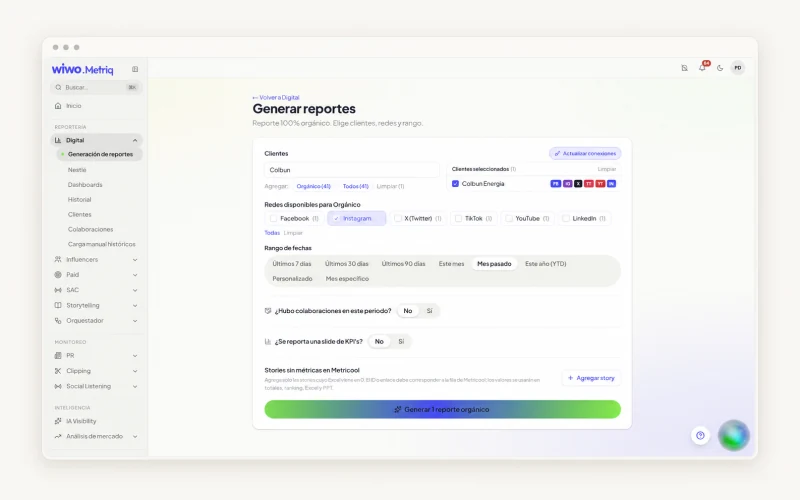
Wiwo.MetriQ includes reports for company pages and executives’ profiles. Teams can review posts, community and engagement and, where appropriate, use spreadsheets or screenshots supplied by the team. Each source retains its value when the report does not pretend coverage is identical.
Distinguish the page, the person and the period in the report. Select posts that support the conclusion and pair indicators with a clear editorial recommendation: develop a topic, clarify an explanation or test another approach. The report then helps prepare the next conversation as well as showing what has been published.
Frequently asked questions
Can I add up followers across all profiles?
You can show an aggregate count of follows if you describe it that way, but not as unique reachable people. Communities may overlap.
What if an executive only shares screenshots?
Keep their date, the post and visible indicators. MetriQ can use supplied materials where appropriate; the report should clarify what information is available.