Every conversation continues
Messages, history and contact details in a shared inbox, so your team can continue with context.

Check messages and history, track opportunities by stage and review sales activity.
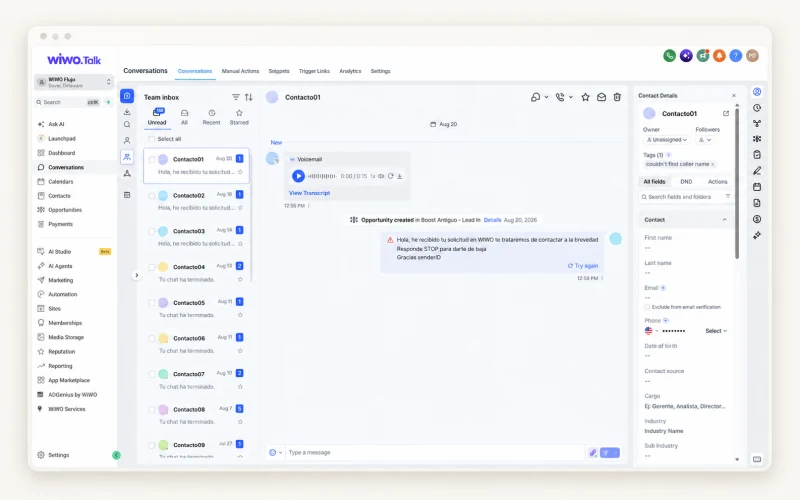
Messages, history and contact details in a shared inbox, so your team can continue with context.
Organize your pipeline by stage and coordinate follow-up with your sales team.
Connect your dashboard overview with your team's conversations, opportunities and schedule.
Choose an inquiry, prepare a response and hand the conversation to a person.
Hi, I'd like to learn more about this solution.
This example does not send messages.
Switch views, take a closer look at the interface, and discover how each feature can support your team.
Open the contact's messages and history before replying. A shared inbox helps the team understand what was discussed and how to continue.
Customer service, opportunities, scheduling and lead capture tools around the same contact.
Find the relationship's history before preparing the next step.
Consult messages from connected channels and the contact's history. Your team can resume service with information from earlier conversations.
Find people, review their fields and consult recorded activity. Use lists and filters to prepare follow-up for contacts with a shared need.
Organize opportunities by stage and consult their details. Service and sales share a view of progress to agree on the next conversation.
Scheduling, activity and reputation help you follow the relationship.
Consult calendars and upcoming appointments to coordinate team conversations. Implementation defines the calendars and booking journey your operation needs.
Review the activity and opportunity summary. Prepare reports with available indicators and, depending on configuration, arrange delivery to support team follow-up.
Consult ratings, review volume and evolution by source and date. Prepare review requests from the module to keep listening to customer experiences.
Assistance configured for a specific service journey.
Define the agent's purpose and the steps it can assist with. Scope is agreed with your team before activating it in customer service.
Prepare the company information that guides responses. Review the content the agent needs and update it when products, services or service rules change.
Agree when a person should take over and which decisions stay with the team. Configuration defines channels, actions and escalation conditions for that journey.
Marketing and lead capture tools connected to the sales journey.
Organize pages and lead capture journeys in the sites module. Prepare the steps a contact needs to submit their details or book a conversation, depending on implementation.
Organize posts for connected profiles in a list or calendar view. Consult content, status, type and date; filter by period or search post text.
Add forms to the lead capture journey and define with your team how the relationship continues. Fields, rules and integrations are agreed for each operation.
Channels, calendars, agents, review sources and integrations are enabled according to the agreed scope. The demo confirms the journey and modules your team needs.
Marketing, sales and customers in one place. See how Wiwo.Talk connects every conversation to its next step.
Wiwo.Talk is Wiwo's conversation and growth intelligence solution. It connects omnichannel inbox, CRM, journeys, automation, collaboration and agents with shared memory.
The system hands off the conversation, summary, and relevant data so the person can continue without forcing the customer to start again.
Every agent declares its mission, autonomy, allowed actions, guardrails, and escalation rules. Identity, permissions, and logs show who did what and when.
Sales, service, and marketing teams that need to organize the work described on this page.
Let's review your needs, the available features, and how to get started.