A presentation is ready when its audience understands what it needs to know and what conversation comes next, not when every slide has content.
Decide what the recipient needs to understand
A work report and a sales proposal can start from the same document and need very different presentations. Before generating, write down who the slides are for, what that person knows and what they should be able to decide afterward. This prevents the document's table of contents from being treated as a story in its own right.
In a hypothetical example, a team might have a long report and need to discuss only its main findings. Selecting the material requires judgment: preserve what matters without hiding the conditions needed to interpret each conclusion.
Provide material that can be checked
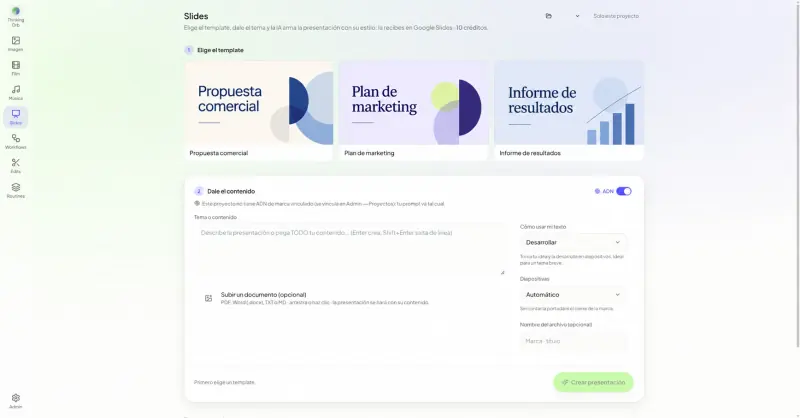
Slides in Lab lets you start from a topic, text or documents in PDF, DOCX, TXT and MD formats. You can choose a template and set options such as slide count and how the content is handled. Review the input first: an outdated figure or ambiguous conclusion may carry through into the proposal.
Remove information that should not be shared and identify the sources you need to retain. If the document combines different periods or markets, clarify that before turning it into a single visual story.
Review the order before polishing the design
The initial proposal helps reveal the story being constructed. Check that the presentation raises a question, provides the necessary information and leads to a recognizable conclusion. If the argument does not hold up, changing colors or adding images will not solve it.
- Check that each slide contributes something different.
- Separate evidence, interpretation and recommendation.
- Keep visible the conditions that affect how the data should be read.
Use Google Slides to finish the conversation
The Google Slides output lets you continue editing the content with your team. Review headings, charts, images and text volume. A template provides a visual starting point, but it does not know which fact needs emphasis or which sentence could be misunderstood outside its context.
Read the slides without the original document beside you. If you need to explain an essential condition verbally because it is missing, add it. Also check text size on the presentation screen and in the view available to whoever receives the file.
Do not confuse generated content with validated content
Verify names, dates, units and attributions against the source material. Check that no paraphrase has turned a possibility into a promise or an opinion into a fact. Whoever owns the presentation should be able to support every statement they choose to share.
A Lab demo can walk through an authorized team document to show the available options. The generated result is a working starting point. Editorial control, material permissions and final approval remain part of presenting well.
Frequently asked questions
Which documents does Slides support?
The published scope includes PDF, DOCX, TXT and MD, as well as a topic or written text. The demo can confirm which options are enabled for your configuration.
Can I edit the presentation afterward?
Yes. The output is in Google Slides. The team can review and edit the material before approving and sharing it.